The Classic Free Images collection
Public-domain art: finding useful images with a clear source record
Find the image and keep its evidence
Finding an attractive image is only the first part of finding useful public-domain art. The stronger result is a picture accompanied by a clear object record, an understandable rights statement and a file that suits your project. A small amount of organisation at the beginning saves a great deal of uncertainty later.
Start with a subject and a practical purpose
Write a short description of what you need before browsing. “A tall poster with strong lettering for a study sheet” is more useful than “something vintage.” It gives you a way to judge proportions, visual detail and the relationship between picture and text.
Add the intended output. A classroom handout, a website illustration and a large wall print have different file requirements. You can then reject unsuitable candidates early instead of discovering after designing a layout that the available image is too small.
Keep your initial search flexible. You might begin with a subject such as flowers, travel or performance and then narrow by format. A useful image may come from a print, drawing, illustrated book or poster rather than the medium you first imagined.
Look for an institution’s actual reuse programme
The Metropolitan Museum of Art’s Open Access programme offers images of public-domain works and collection data under CC0. Its collection pages identify Open Access material, so the programme supplies both a place to browse and a way to connect an image with a specific record.
Read the programme information, then check the individual object. A museum can hold material with different rights statuses. Its participation in open access does not mean that every photograph, exhibition graphic or page of explanatory text on the website has the same terms.
Download from the object’s own record when possible. A search-engine thumbnail or a reposted social image can separate the picture from the details that make it useful. Returning to the source also helps you find a better file and the correct title.
Use one complete example as a model
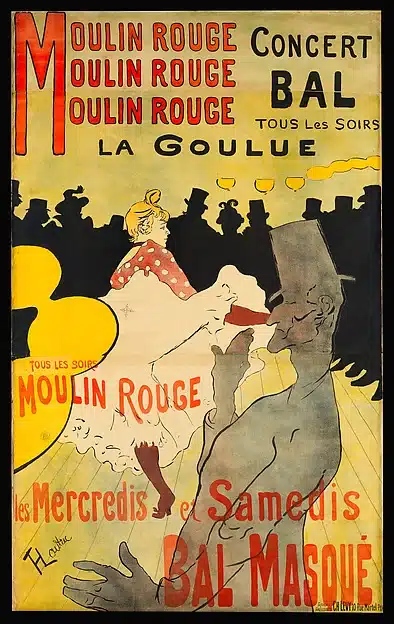
The Met’s record for Moulin Rouge: La Goulue, illustrated above, identifies the artist, date and medium and marks the image Public Domain. Those are separate pieces of information: the identification describes the object, while the rights designation helps explain the offered reuse.
A useful project note records the institution, object title, artist as catalogued, object number, source URL, displayed rights statement and the date you checked it. You do not need to turn the note into a long essay. It needs to be clear enough for someone else to find the same evidence.
Keep approximate dates approximate. If a record uses a date range or a qualification, copy that distinction into your factual notes. Being precise about what the source says is more valuable than making every field look certain.
Understand the label you are relying on
Creative Commons distinguishes between tools that identify public-domain material and tools through which a rights holder relinquishes rights to the extent possible. Its public-domain overview explains CC0 and the Public Domain Mark. They should not be treated as interchangeable names for any image available without a download charge.
Read the linked statement behind an icon. Keep the actual designation in your notes rather than translating everything into “free.” The terms “public domain,” “licensed for reuse” and “free to view” can describe different situations.
A rights label also needs context. Check whether it concerns the image file, the underlying artwork, the catalogue data or another part of a page. If that relationship is unclear and your intended use depends on it, ask the provider or choose a more clearly documented alternative.
Choose the version that your project needs
Look at the whole available image before downloading. Does it include the complete sheet, or only a cropped picture area? Are the margins and inscriptions relevant to your purpose? A decorative crop can be attractive while omitting the very details needed for a research handout.
Compare the available pixel dimensions with the intended output. A large preview on a high-density screen is not a physical print-size guarantee. Inspect fine lettering and line work, then make a small proof if your project will be printed.
Keep the source file unchanged and produce an appropriately sized working copy. This makes it easier to revise a crop, return to a missing margin or prepare a different output without searching for the original download again.
Keep source, working and final files apart
A simple project folder can contain the downloaded source, its research note, an editable working document and the final export. Use filenames that help distinguish them. A later collaborator should not have to guess whether a brightly recoloured version came directly from the museum.
Record meaningful changes in a short note: cropped, colour adjusted, cleaned or combined with modern text. That is especially helpful when an image will appear in an educational context, where readers may otherwise understand your adaptation as a faithful reproduction.
Keep an accessible text description with the final design. Describe the visible subject and its role in the project. An image’s public-domain designation does not provide alternative text or explain why you selected it.
Credit the source so the image remains discoverable
A short credit can be useful even where the offered terms do not require one. It lets readers locate the record, explore related works and check details that your layout cannot include. It also distinguishes a well-documented reproduction from a picture circulating without a source.
Use the source’s recommended credit when one is supplied and suitable for the context. Include a link in a digital publication. If space is limited, place a fuller credit in an image list rather than replacing it with a vague reference to “the internet.”
Do not suggest that a museum endorses your product or project merely because you used an openly available image. A factual source credit describes where the image came from; it is not a partnership statement.
Let the object’s context improve the adaptation
Spend a few minutes reading the object record before treating the image as a decorative fragment. A poster’s lettering, a print’s border or an inscription can be central to its meaning. Preserving one of those features may make the new design more interesting.
Try two versions of a proposed layout: one using the whole composition and another using a detail. Compare what each version gains and loses. Choose the crop because it serves the new purpose, while keeping a route back to the complete source.
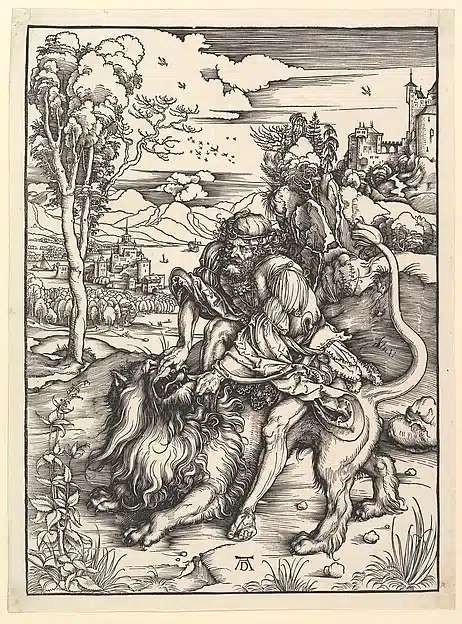
For line-based artwork, the printmaking guide offers a way to look at reproduced marks. For a physical display, the wall-art printing guide connects file choice with proofing and output.
Keep unresolved rights questions visible
Copyright rules and other relevant rights can depend on the work, the use and the jurisdiction. An image’s age or a familiar subject is not a substitute for the evidence you need. Our image licensing guide describes a broader UK-focused research workflow; seek appropriate advice where an important use remains uncertain.
You can also browse the Famous Paintings and Art Nouveau galleries for visual inspiration. The external museum examples in this guide are identified separately and are not represented as files included in a paid Classic Free Images collection. Judge a collection by its own description and the available records for the images you intend to use.